Step 5 – Add the other maths operators
Now we need to add maths opertaors to deal with subtracting, multiplying, and dividing.
We could simply add more if lines like in step 4, but there's a better way to do this.
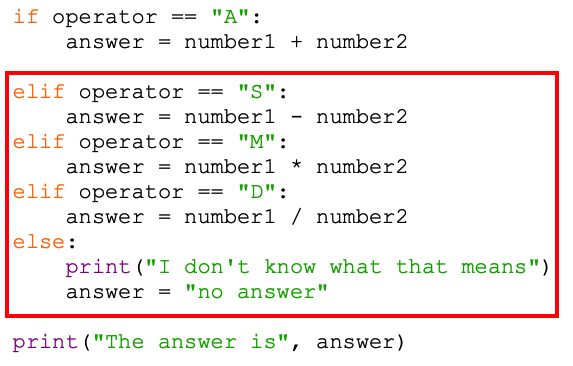
- Look carefully at where to add this code
- I've used some elif lines to deal with the other inputs.
- Elif means "Else if". It's a better way of dealing with a set of instructions when we know we're only ever going to want to deal with one of them.
- Watch your idents! It's easy to make a mistake here. Each elif line starts at the same spot as the if line did – all the way to the left
- Make sure you add the colon at the end of each line
- At the end I've added an Else line. This deals with what happens if the user enters anything other than A, S, M, or D. (must be a capital letter)
- Run your code to test it works using capital letters only (Run > Run Module)
Make sure you test A, S, M, and D.