Step 1 – Print the intro
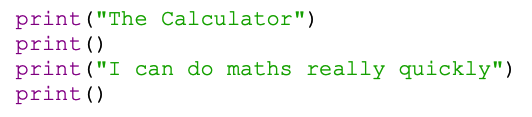
We'll start by printing a title and an introduction to the program.
You've done this sort of thing before so you know how it works.
- Use the code in the screenshot
- Remember, the line print() just prints a blank line. This keeps the program easier to read for the user.
- Save your program in your OneDrive. Call it something like calculator
- Run your code to check everything is working OK (Run > Run Module)
Python will ask you to save your code each time you make a change and then run it. Just say OK each time.