Step 3 – Get the maths input
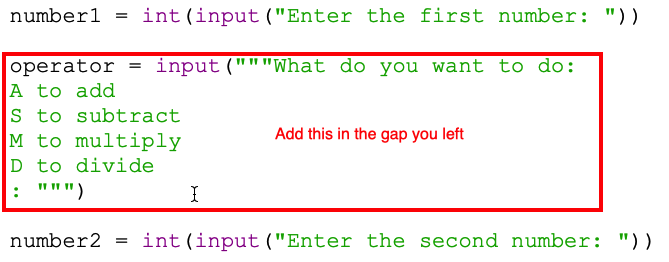
Now we need the user to be able to tell us what they want to do with the two numbers.
Remember that gap you just left? We'll add this code in there.
- ADD THIS IN THE GAP YOU LEFT
- This uses an input statement again. But this time we're expecting a letter (a string)
- I'm using a single letter code for this: A for addition; S for subtraction; M for multiply; D for divide.
- That takes quite a bit of space, so I'm using a Python hack to make it quicker to do this. The three quote marks (""") means I can type my text over more than one line. It's just quicker to do this.
- I'm storing the value in a variable caller operator. Because what we'll doing is getting the maths operator that we want to use to do the maths bit.
- Run your code to test it works (Run > Run Module)
Now you can enter the two numbers and the maths operator, but nothing else happens yet.