Step 4 – Do some maths
Now we can do some maths.
I'm just doing the first part of this for now.
We need to use selection to decide what to do next.
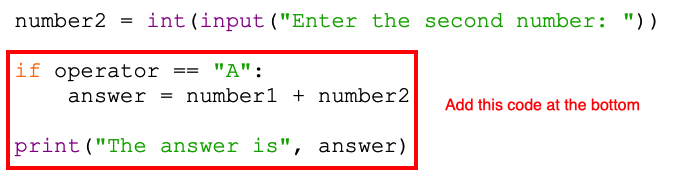
- This code goes at the bottom of your program
- I'm going to start with addition, so if the user entered an "A" I want to add the two numbers together. This uses an if statement.
- The if line needs to have a colon (:) at the end
- We need to use two equals signs to check if the two things are the same. Make sure you use == in the if line
- Check your indents!
- Add the print line underneath so that the answer is displayed
- Run your code to check it works (Run > Run Module)
Test with an A entered. This should add the two numbers together.
If you enter S, M or D nothing will happen yet.